 isla
Your cycle, on your iPhone and nowhere else.
No account, no ads, no pop-ups. Your next period is estimated from your own log, on the phone.
Download on the App StoreTry the period calculator
- No account
- No ads
- Nothing you log is sent to us
Isla estimates your cycle from what you log. It is not birth control and it is not medical advice.
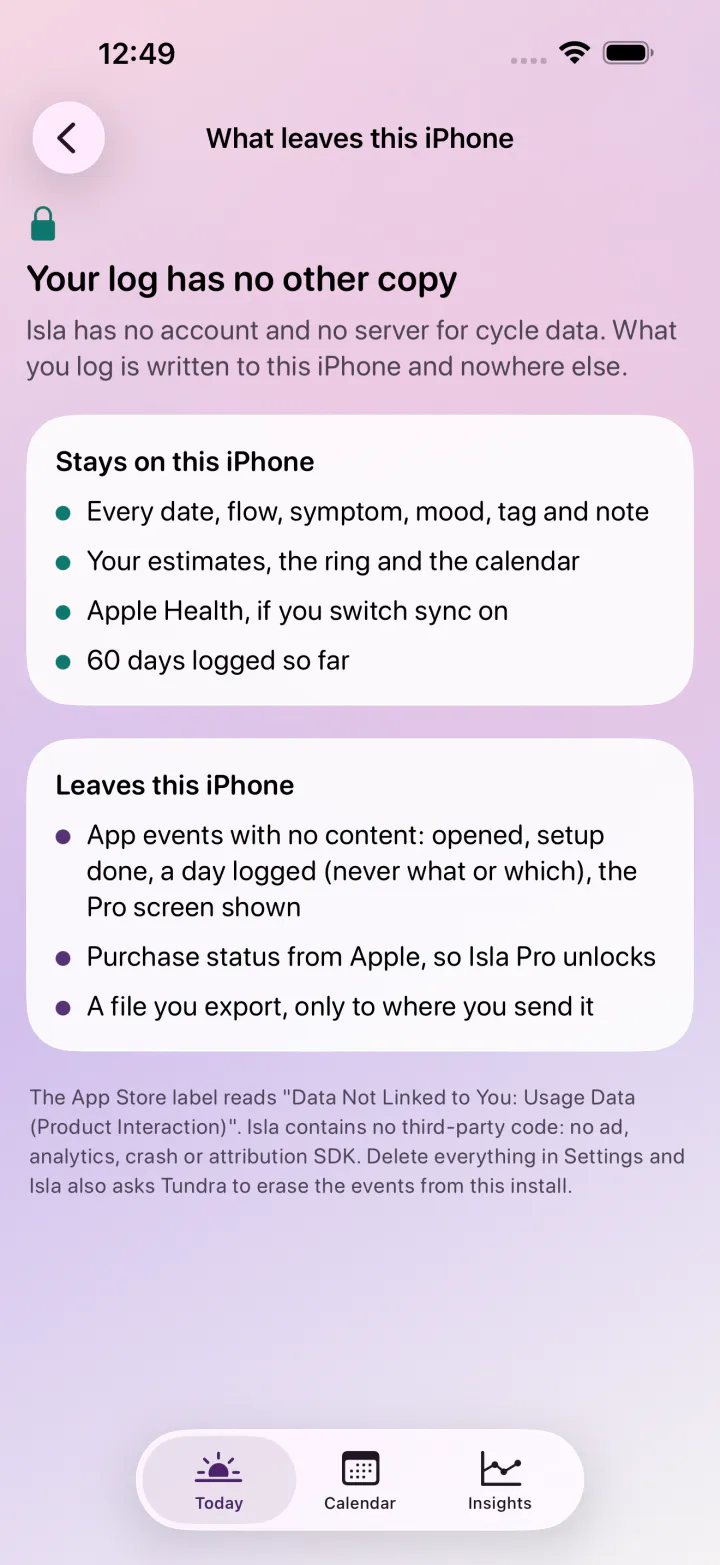
What stays, and the short list of what leaves
Isla has no account and no server for your log. The same list is a page inside the app.
Stays on the phone
- Every date, flow, symptom, mood, tag and note you log
- Your estimates, the ring and the calendar
- Cycle Tracking in Apple Health, when you switch sync on
- Exports, which go only where you send them
Leaves the phone
- Anonymous app events: opened, setup done, a day logged (never what), the Pro screen shown
- Purchase status from Apple, so Isla Pro unlocks
- Nothing else. No account exists to send it to.
The App Store privacy label reads "Data Not Linked to You: Usage Data (Product Interaction)".
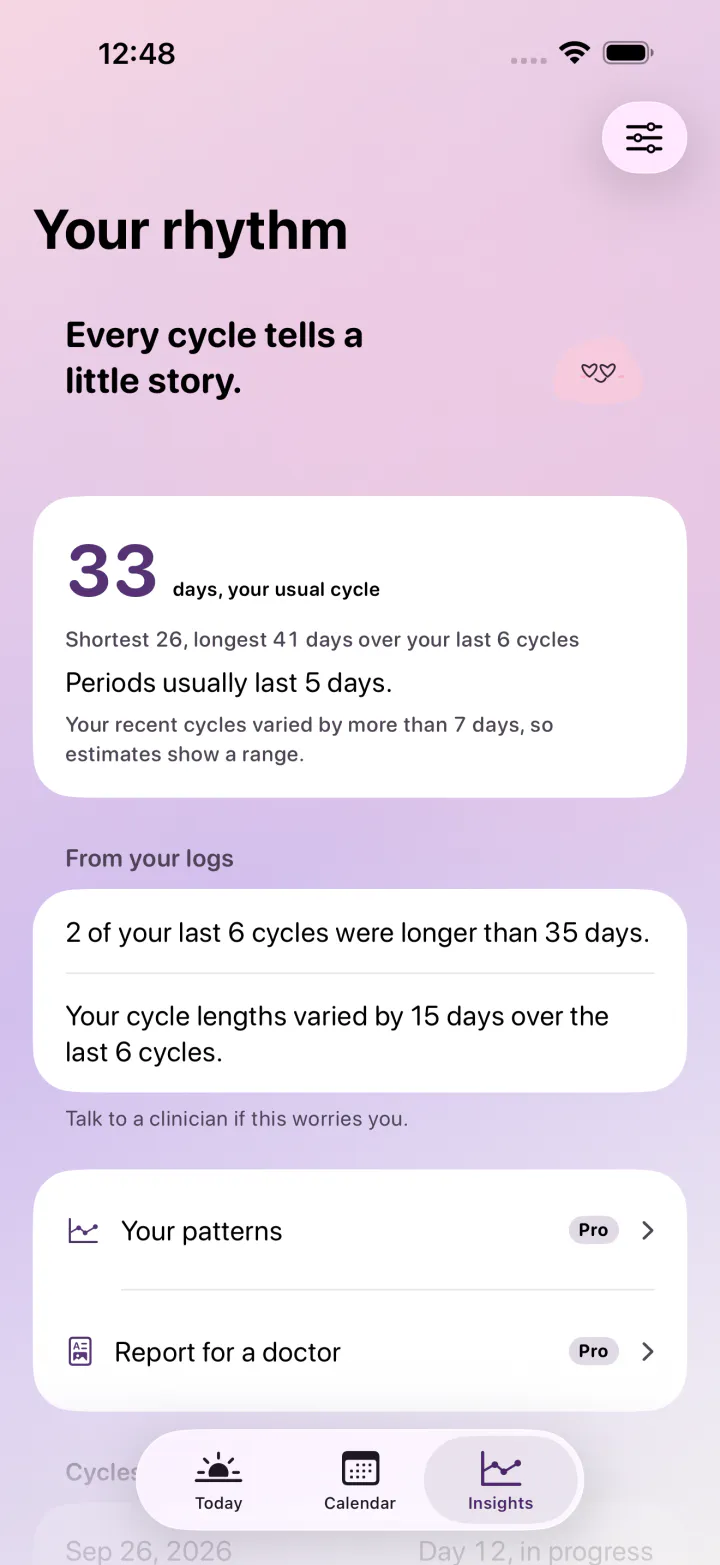
An estimate that shows a range when cycles vary
Isla takes the typical length of your recent logged cycles. When they differ by more than a week, you see a range instead of one date.
- A long gap that looks like a missed log is set aside
- A logged temperature rise or positive ovulation test can move the ovulation estimate
- Perimenopause mode (Pro) counts long gaps as real cycles
- Every date is labelled as an estimate
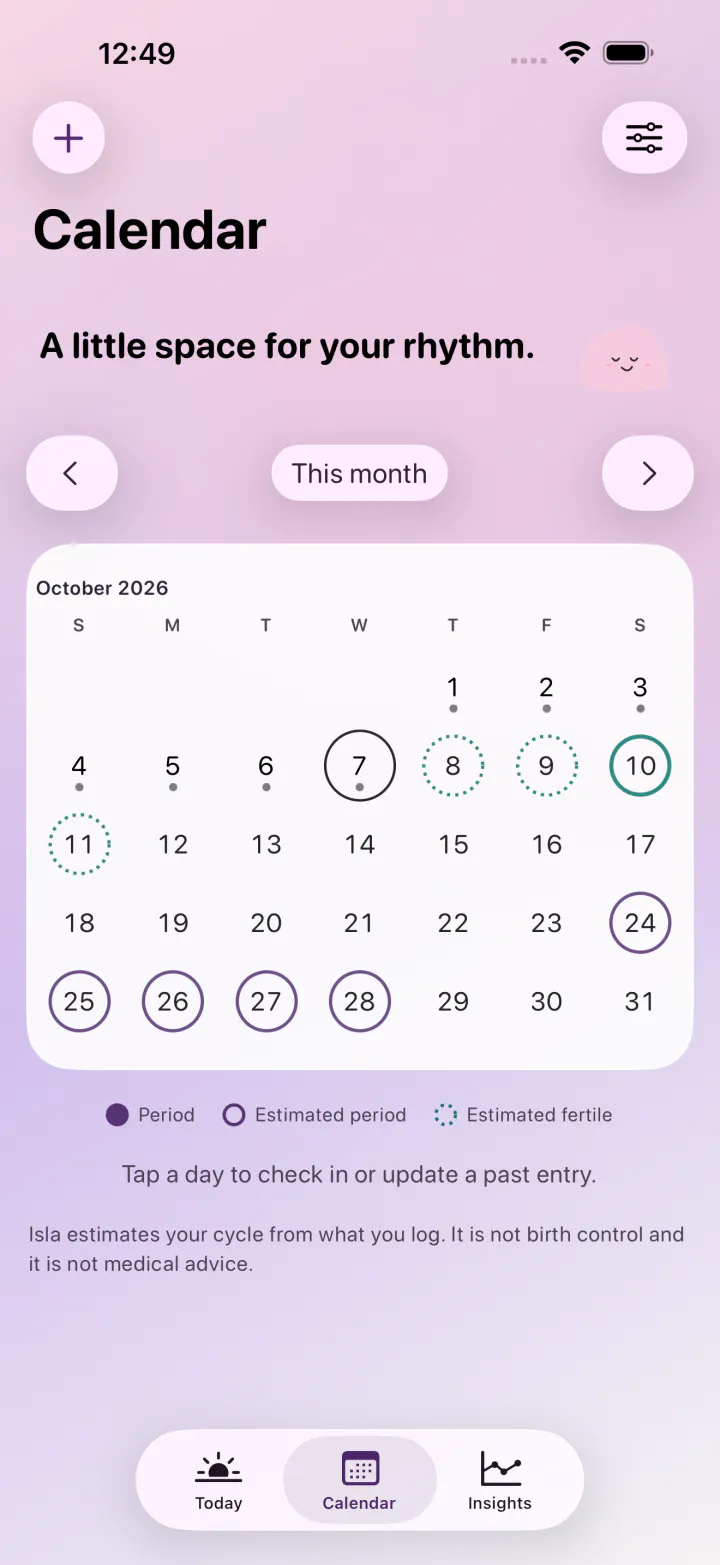
On the calendar, the Lock Screen and your wrist
The calendar opens on this month with logged days, the estimated period and the estimated fertile window marked. The same estimate reaches the rest of the phone.
- Home Screen and Lock Screen widgets
- Control Center button
- Siri and Shortcuts
- Lock Screen countdown, off by default
- Apple Health, both ways, on the device
- Apple Watch complication
- Logging from Apple Watch (Pro)
Discreet wording keeps the word period off widgets, reminders and the Lock Screen countdown.
In the app
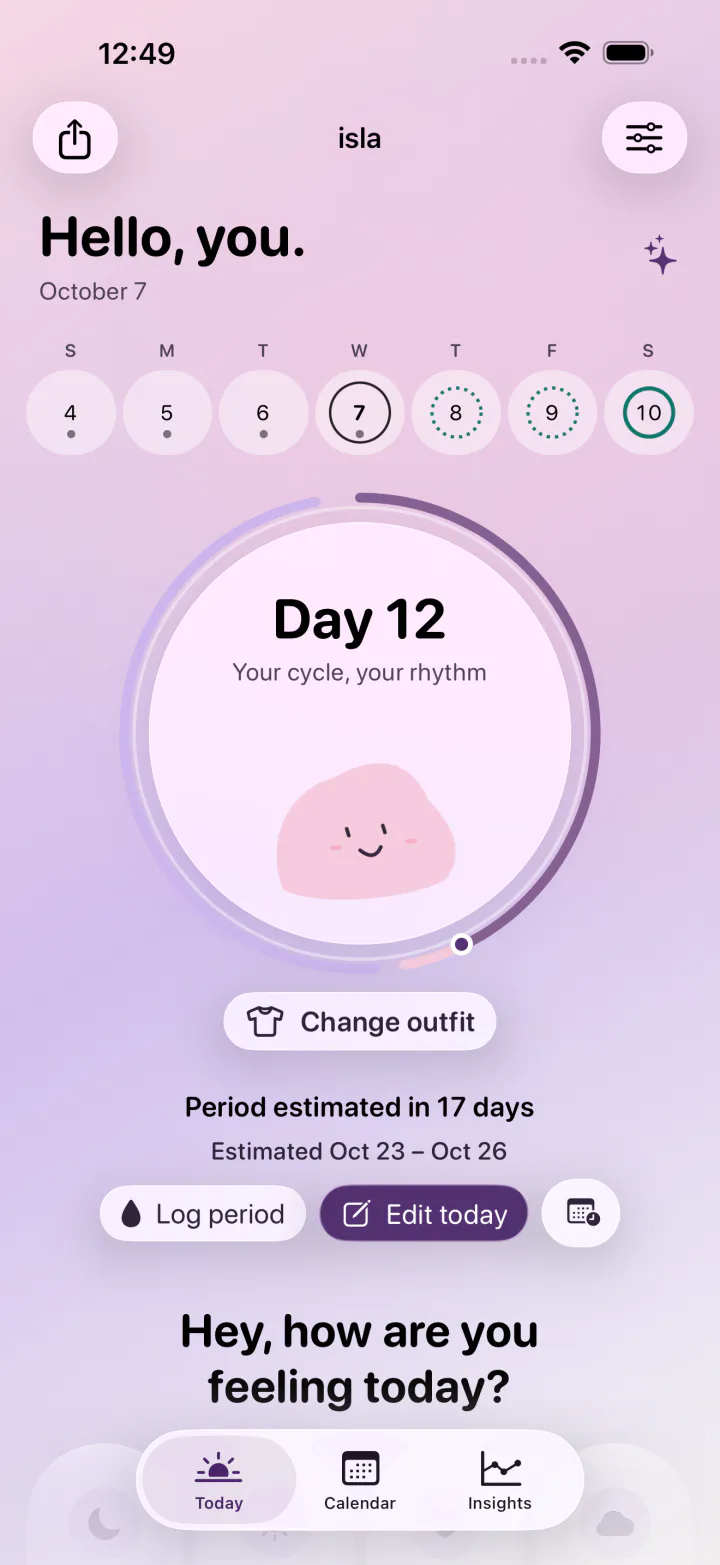
The ring of days
One dot per day of your cycle, with logged period days, the estimated next period and the estimated fertile window each drawn in its own colour.
Kept on this iPhone
No account and no server for your log. A page inside the app spells out what leaves the phone, and none of it is anything you logged.
Setup on one screen
Tap the day your last period began, set how long it usually lasts, and your first estimate appears while you tap.
Quiet on purpose
No ads and no pop-ups. Reminders start switched off and can be worded so they never name your period.
Locked and low-key
App Lock with Face ID or Touch ID, a discreet app icon, and widgets that can keep quiet about what they count.
A report your doctor can read (Pro)
A PDF of your cycles and symptoms for any date range, made on the phone and handed over only by you.
Move in from Flo or Clue (Pro)
Open their data export in Isla, look over the preview, and only days Isla does not already have are added.
Next to the apps people leave
| Isla | Flo | Clue | Stardust | Apple Health | |
|---|---|---|---|---|---|
| Sign-up before use | none | optional (Anonymous Mode limits export) | account required | not found | none |
| Data used to track you, per the App Store label | none | purchases, location, identifiers, usage data | identifiers | purchases, identifiers, usage data | built into iOS, no label |
| Ads or upgrade pop-ups | none | upgrade pop-ups | upgrade pop-ups | third-party advertising listed | none |
| Notes on any day | free | not found | free | not found | no |
| Home and Lock Screen cycle widgets | free | not found | free | not found | no |
| Perimenopause mode | Pro | free | Pro | not found | no |
| Import from Flo or Clue | Pro | no | no | not found | no |
| Copy of your data from inside the app | JSON or CSV, free | by asking support | JSON zip by email | not found | all-data XML archive |
| Cycle report PDF for a doctor | Pro, any dates | Premium, last six cycles | separate purchase | not found | not verified |
| Price | $9.99 once, $5.99 a year or $1.49 a month | up to $59.99 a year | $29.99 to $39.99 a year | $6.99 a month, $24.99 to $39.99 a year | free |
Read from each App Store page and help center; dates in EDGE.md.
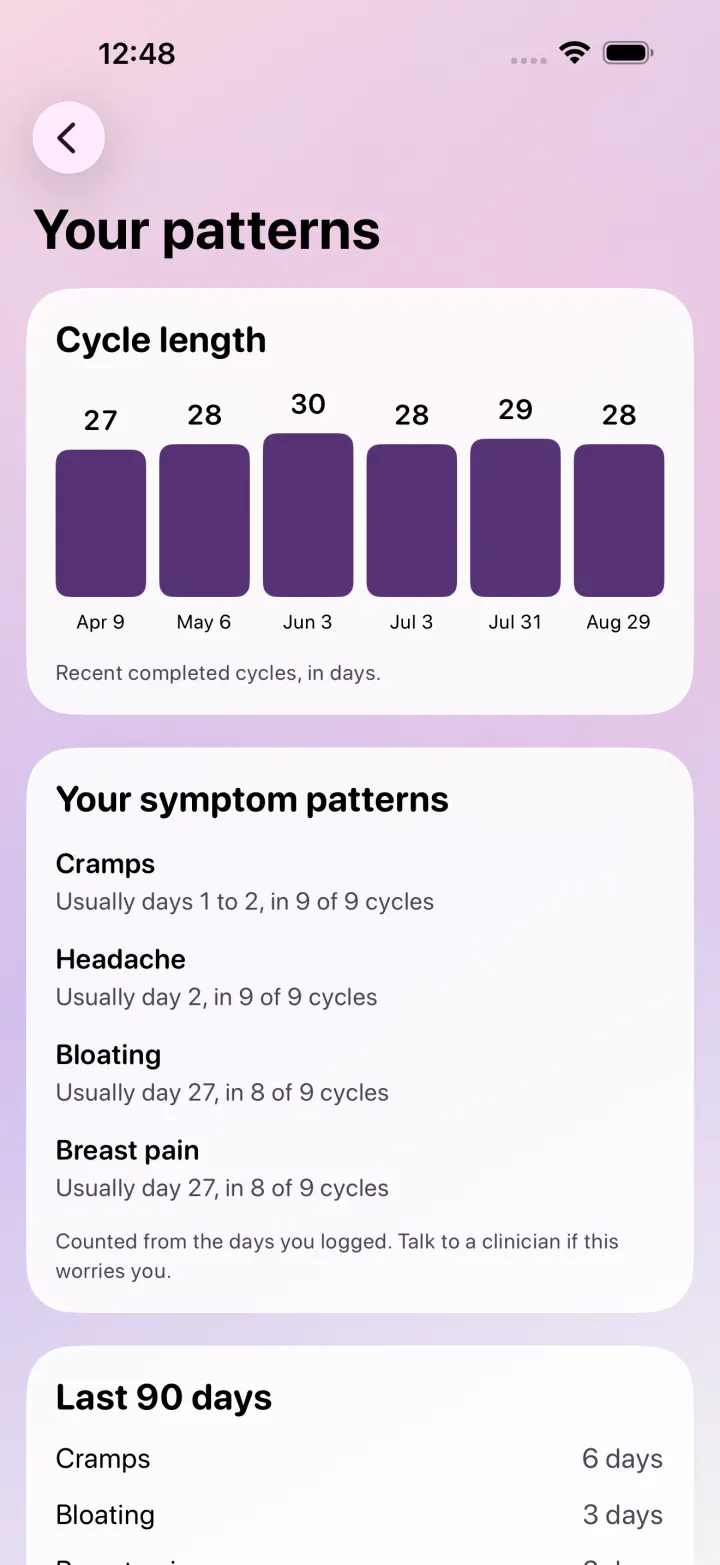
Isla Pro goes deeper into your own history
- A cycle report PDF for a doctor, for any dates you choose
- Your symptom history and the patterns in it
- Pregnancy mode and perimenopause mode
- Logging from Apple Watch
- Your past cycles moved in from a Flo or Clue export, or a CSV file
Plans
Free for good: the ring of days, the next-period estimate, the calendar, reminders, widgets, Apple Health, App Lock and export. Isla Pro is for depth: the report for a doctor, your symptom patterns, pregnancy and perimenopause modes, Apple Watch logging and imports from Flo, Clue or a CSV.
Lifetime
one payment
One payment, no renewal. Shared with your Family Sharing group.
Yearly
per year
7-day free trial, then $5.99 per year.
Monthly
per month
For a doctor visit or a single month.
Amounts shown in US dollars; your App Store storefront shows its own. Yearly and Monthly keep renewing until you turn renewal off in your Apple Account, at the latest a day before the next charge.
Free on this site
Period date calculator
Your next six estimated periods and a calendar file, worked out in your browser. Nothing is sent.
Privacy guides
What a period app can see, reading its privacy label, and keeping cycle data on your iPhone.
Cycle lengths, 21 to 40 days
How each length falls through the week and the year.
Compared
Isla next to Flo, Clue and Apple Health, from their own pages.
Asked before installing
What leaves my iPhone when I use Isla?
A few anonymous app events for Tundra's own analytics, such as "the app opened" or "a day was logged". They carry no dates, flow, symptoms, moods or notes, and they are not linked to you. Inside Isla, tap the "Kept on this iPhone" pill on Today to see the full list.
Can I rely on the fertile window to avoid pregnancy?
No. Isla estimates your cycle from what you log. It is not birth control and it is not medical advice. The window is drawn in teal and labelled as an estimate so it is never read as anything more.
How does Isla work out my next period?
It looks at the length of your recent logged cycles and uses their typical value, showing a range when they differ by more than a week. A long gap that looks like a missed log is set aside. A logged temperature rise or positive ovulation test can move the ovulation estimate.
I have years of history in Flo or Clue. Can I bring it?
Importing a Flo or Clue file is part of Isla Pro. Request your data from Flo through its Help screen, or use Download my data in Clue. Then in Isla open Settings, Your log, Bring your history, and pick the file. You see what Isla found before anything is saved, and days already in Isla are skipped.
What happens to my log when I get a new iPhone?
Isla 1.0 does not use iCloud for your log. On the old phone, Settings, Your log, Export a copy (JSON). On the new phone, Bring your history, Isla backup. Both steps are free.
Can someone holding my phone tell that Isla is a period app?
Not easily. Turn on App Lock and Isla asks for Face ID, Touch ID or your passcode. Discreet wording keeps the word "period" off widgets, reminders and the Lock Screen countdown, and the discreet icon replaces the shell on your Home Screen.
Is there a way to pay for Pro without a subscription?
Yes. Lifetime is $9.99 once and is listed first. It also covers the people in your Family Sharing group. Yearly is $5.99 with a 7-day free trial and Monthly is $1.49. To stop a plan, open Settings, Isla Pro, Manage subscription, and switch renewal off a day or more before it renews.
Can I erase everything Isla has stored?
Yes. Settings, Your log, Delete everything removes every logged day from this iPhone at once, and it cannot be undone. Days Isla wrote to Apple Health remain in Health until you remove them there.
Does Isla work with Apple Health and Apple Watch?
Apple Health sync is free and runs both ways on the device. Logging from Apple Watch comes with Isla Pro; the Watch complication showing your cycle day is free.
Keep your cycle to yourself.
A period log that never leaves your iPhone.